Appium, iframes and iOS

When performing end to end journey test automation on an eccommerce style website, it’s common for security reasons for the credit card fields to be loaded in an iframe to allow payment forms from a payment service provider to added to a website in a secure manner.
This presents no issues for a human user when entering their credit card details, but that’s not always the case with test automation.
On desktop browsers, and on Chrome on Android, the steps to enter card details within an iframe is typically fairly straightforward:
const iframe = $('#iframe')
await browser.switchToFrame(await iframe)
await $('#name').setValue('Test User')
await $('#card-number').setValue('4111 1111 1111 1111')
await $('#expiry').setValue('11/30')
await $('#cvv').setValue('123')

await browser.switchToParentFrame()
However performing this on safari on iOS, will result in an error like this:
org.openqa.selenium.WebDriverException: An unknown server-side error occurred while processing the command. Original error: Blocked a frame with origin “https://example.com 1” from accessing a cross-origin frame. Protocols, domains, and ports must match.
Sure enough, if you type "appium iframes iOS" into a search engine, and you'll find many results about issues with switching to iframes due to cross site security issues (for example - https://discuss.appium.io/t/not-able-to-select-iframes-in-ios-safari/37944).
Still, I thought there might still be a away to force some data into fields. I had some experience finding workarounds in similar situations. For example, it’s typically possible to send arbitrary low level keys to an element if you have focus on that element. So, how could we brute force focus on to the elements?
First step - what happens if we click the iframe? Can we click an iframe?? Turns out we can:
so I started by asking myself, "Can I at least force a click into the iframe?" It turns out we can when we use the nativeWebTap capability (for much more on this see https://www.headspin.io/blog/using-the-nativewebtap-capability)
await $('#iframe').click()
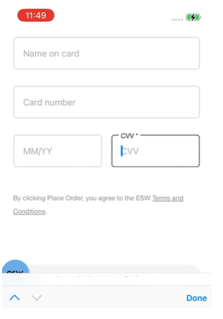
So by clicking on the iframe, we’ve got focus on one of the fields we need to fill in.
This leaves us two problems / questions
How do we send keys to the field?
How do we get focus on the other fields?
Entering keys into a field
For these fields we need to leverage low level actions API, as using the normal methods will not work - in this case we use key presses.
await browser.action('key')
        .down('1').up('1')
        .down('2').up('2')
        .down('3').up('3')
        .perform()
Having successfully entered text into a field, we needed to be able to navigate to other fields. Looking again at the screen, the keyboard was showing, so perhaps we could leverage that to tab between fields?
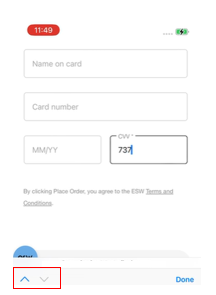
They keyboard is outside of the context of the browser, but given we're already using WebdriverIO, switching to that native context using Appium is trivial - and we can then tap that previous button
// store web view context for future use
const webViewContext = await browser.getContext()
await browser.switchContext('NATIVE_APP')
// navigates to expiry date
await $('~Previous').touchAction('tap')
// note, touchAction is deprecated, use Actions api is recommended
We can then switch back to the browser context, and enter the next piece of data:
await browser.switchContext(currentContext.toString())
await browser.action('key')
        .down('1')
        .down('1')
        .down('3')
        .down('0')
        .up('1')
        .up('1')
        .up('3')
        .up('0')
        .perform()
Bringing it all together, using a convenience method for entering the text by actions (enterDigits)
const iframe = $('#iframe')

await iframe.scrollIntoView()
await iframe.click()

const currentContext = await browser.getContext()
await browser.switchContext('NATIVE_APP')
// make sure we are on cvv
await browser.waitUntil(async () => {
if (!(await this.next.isEnabled())) {
        return true
    }
    await this.next.touchAction('tap')
    return false
})

// cvv
await browser.switchContext(currentContext.toString())
await browser.enterDigits('123')
await browser.switchContext('NATIVE_APP')
await $('~Previous').touchAction('tap')

// repeat for expiry date
await browser.switchContext(currentContext.toString())
await browser.enterDigits('1130')
await browser.switchContext('NATIVE_APP')
await $('~Previous').touchAction('tap')

// and so on for card number and name fields
// finally, close the keyboard, and switch back to the browser context
await $('~Done').click()
await browser.switchContext(currentContext.toString())
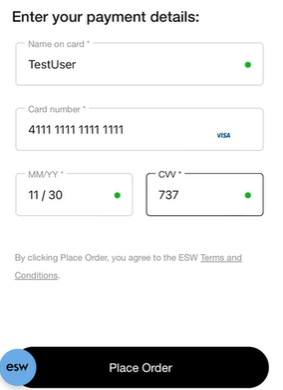
So in summary, to make this work we have
Clicked the iframe which clicks the CVV field
- This has shown to always be reliable, but we navigate to CVV in case we land on a different field
Use actions api to send key presses to the active element
We use appium to interact with the ‘previous’ and Done buttons, switching between the native contect and browser context each time
Hopefully this helps a few people!
Comments
Join the discussionNo comments yet. Be the first to comment.


